Your Claude Code Status Line Can Show How Much Plan You Have Left
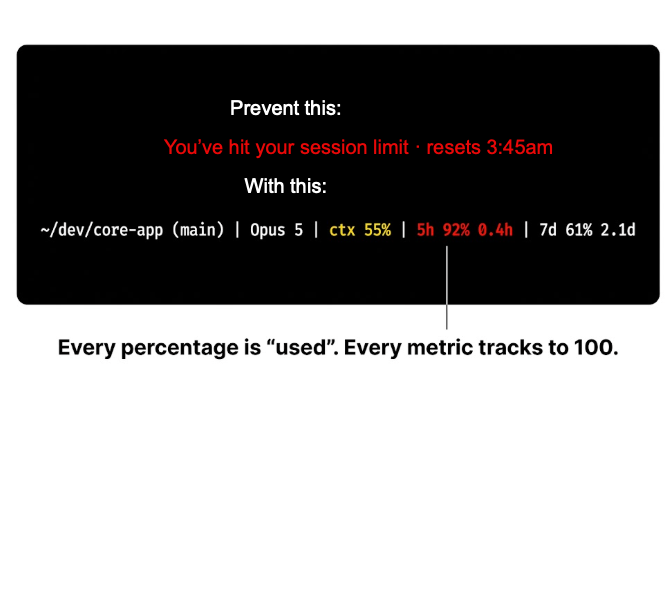
If you work in Claude Code, you have probably had a session stop at the worst possible moment. The client knows how close you are the whole time — it just doesn’t put it anywhere you look.
Mine now reads:
~/dev/core-app (main) | Opus 5 | ctx 12% | 5h 28% 3.1h | 7d 44% 3.2dContext used. 5-hour window used, and time until it resets. 7-day window used, and time until that resets.
Color first — while everything is green I never read the digits. When a field turns amber I know which one, and how long I have.
The Data Is Already Being Handed to You
On every render, Claude Code pipes a JSON object into your statusLine command containing:
"rate_limits": {
  "five_hour": { "used_percentage": number, "resets_at": number },
  "seven_day": { "used_percentage": number, "resets_at": number }
}
No API key, no proxy, no third-party tool. /usage shows the same numbers, but that is a panel you have to remember to open — which is exactly what you don’t do while you are working.
You need Claude Code 2.1.80 or later. That is the release where rate_limits first appears in the status line payload — 2.1.79 does not have it. Check with claude --version.
Four Things That Will Save You Time
-
Subscribers only. The field is null for API key, Bedrock, and Vertex sessions — there is no plan window to report on those.
-
Absent until the first API response of a session, and each window can be missing independently. Guard every read:
jq -r '.rate_limits.five_hour.used_percentage // empty'. -
resets_atis Unix epoch seconds. Subtract now, then format. The countdown is the half that tells you whether the percentage matters — 60% burned with 40 minutes left is fine; 60% burned with four hours left is not. -
Make every percentage “used”, never “remaining.” Mix the two and 10% means healthy in one field and nearly fatal in the next. Same glyph, opposite meaning, read at a glance by someone at the end of a long day.
Setting It Up on macOS
Three steps, about two minutes.
1. Install the one dependency. git comes with the Xcode command line tools. jq does not:
brew install jq2. Save the script and make it executable.
curl -fsSL https://denverbytes.com/assets/statusline.sh -o ~/.claude/statusline.sh
chmod +x ~/.claude/statusline.sh
The full source is reproduced at the end of this post if you would rather read it before you run it — which, for anything you pipe a session payload into, you should.
3. Point Claude Code at it. Add this to ~/.claude/settings.json:
{
  "statusLine": {
    "type": "command",
    "command": "~/.claude/statusline.sh"
  }
}
The status line redraws on the next render — no restart required. If the 5h and 7d segments do not appear right away, that is the expected behavior described above: rate_limits is absent until the session’s first API response, and the script omits a segment entirely rather than printing a misleading zero.
Thresholds are the four numbers in the seg calls at the bottom of the script — yellow and red cut points for each field. Mine are ctx yellow at 41 / red at 56 (56 is roughly where auto-compaction risk starts), and 60 / 85 for both quota windows. Move them to match how close to the edge you are willing to work.
It Works on Windows Too
The whole thing is one shell script. On macOS or Linux it needs bash, jq, and git. On Windows, either run the identical script through Git Bash (winget install jqlang.jq for the one missing dependency), or port it to PowerShell 7, where ConvertFrom-Json replaces jq entirely and ANSI colour works in Windows Terminal.
Ninety-six lines with the comments, about sixty without. It has already paid for itself.
The Script
Also available as a raw file: statusline.sh.
#!/bin/bash
# Claude Code status line: dir (branch) | model | ctx% | 5h% | 7d%
# Reads session JSON on stdin (see https://code.claude.com/docs/en/statusline).
#
# Every percentage is USED, never remaining, so all three move in the same
# direction and a high number always means trouble.
#
# Bands:
#   ctx  green <41   yellow 41-55   red >=56   (56 is where auto-compaction risk starts)
#   5h   green <60   yellow 60-84   red >=85
#   7d   green <60   yellow 60-84   red >=85
#
# A quota segment is omitted entirely when absent: rate_limits appears only for
# Claude.ai subscribers, and only after the first API response of a session.
# Each quota segment carries the time remaining until that window resets,
# computed from resets_at (Unix epoch seconds) and rounded up to one decimal:
# hours for the five-hour window, days for the seven-day window.

input=$(cat)

j() { printf '%s' "$input" | jq -r "$1" | cut -d. -f1; }

MODEL=$(printf '%s' "$input" | jq -r '.model.display_name // "?"')
DIR=$(printf '%s' "$input" | jq -r '.workspace.current_dir // .cwd // ""')

CTX=$(j '.context_window.used_percentage // 0')
H5=$(j '.rate_limits.five_hour.used_percentage // empty')
H5_AT=$(j '.rate_limits.five_hour.resets_at // empty')
D7=$(j '.rate_limits.seven_day.used_percentage // empty')
D7_AT=$(j '.rate_limits.seven_day.resets_at // empty')

GREEN=$'\033[32m'
YELLOW=$'\033[33m'
RED=$'\033[31m'
OFF=$'\033[0m'

# seg <label> <used%> <yellow-at> <red-at> [resets_at-epoch] [unit: h|d]
# Prints nothing when the value is absent.
seg() {
  local label=$1 val=$2 yel=$3 red=$4 at=$5 unit=$6 color extra=""

  [ -z "$val" ] && return 0
  case $val in *[!0-9]* | '') return 0 ;; esac

  if [ "$val" -ge "$red" ]; then
    color=$RED
  elif [ "$val" -ge "$yel" ]; then
    color=$YELLOW
  else
    color=$GREEN
  fi

  case $at in *[!0-9]* | '') at="" ;; esac

  if [ -n "$at" ]; then
    local now rem span tenths
    now=$(date +%s)
    rem=$((at - now))
    [ "$rem" -lt 0 ] && rem=0

    # Tenths of a unit, always rounded up.
    case $unit in
      d) span=86400 ;;
      *) span=3600 ;;
    esac
    tenths=$(((rem * 10 + span - 1) / span))

    extra=$(printf ' %d.%d%s' "$((tenths / 10))" "$((tenths % 10))" "$unit")
  fi

  printf '%s%s %s%%%b%s' "$color" "$label" "$val" "$extra" "$OFF"
}

DIRNAME=${DIR##*/}

# Git branch, if the working dir is a repo.
BRANCH=""
if [ -n "$DIR" ] && git -C "$DIR" rev-parse --git-dir >/dev/null 2>&1; then
  BRANCH=$(git -C "$DIR" branch --show-current 2>/dev/null)
fi

if [ -n "$BRANCH" ]; then
  LOC="$DIRNAME ($BRANCH)"
else
  LOC="$DIRNAME"
fi

OUT="$LOC | $MODEL"

for part in "$(seg ctx "$CTX" 41 56)" \
            "$(seg 5h "$H5" 60 85 "$H5_AT" h)" \
            "$(seg 7d "$D7" 60 85 "$D7_AT" d)"; do
  [ -n "$part" ] && OUT="$OUT | $part"
done

printf '%s\n' "$OUT"